Running Coding Agents in Parallel with Git Worktrees
Running several coding agents at once is one of the biggest productivity gains in software development right now. While many developers simply start a second agent in the same project, there is a better solution available: giving every task its own git worktree. In this post I will show how that works, and how we do it every day in Compagnion, the Mac app we build for it.
By default, a coding agent like Claude Code or Codex works in the checkout you start it in. That works fine for one agent, but as soon as you start a second one, both agents edit the same files, one runs npm install while the other runs the tests, and your own working copy ends up in an unknown state. To mitigate this, we can give every task its own git worktree.
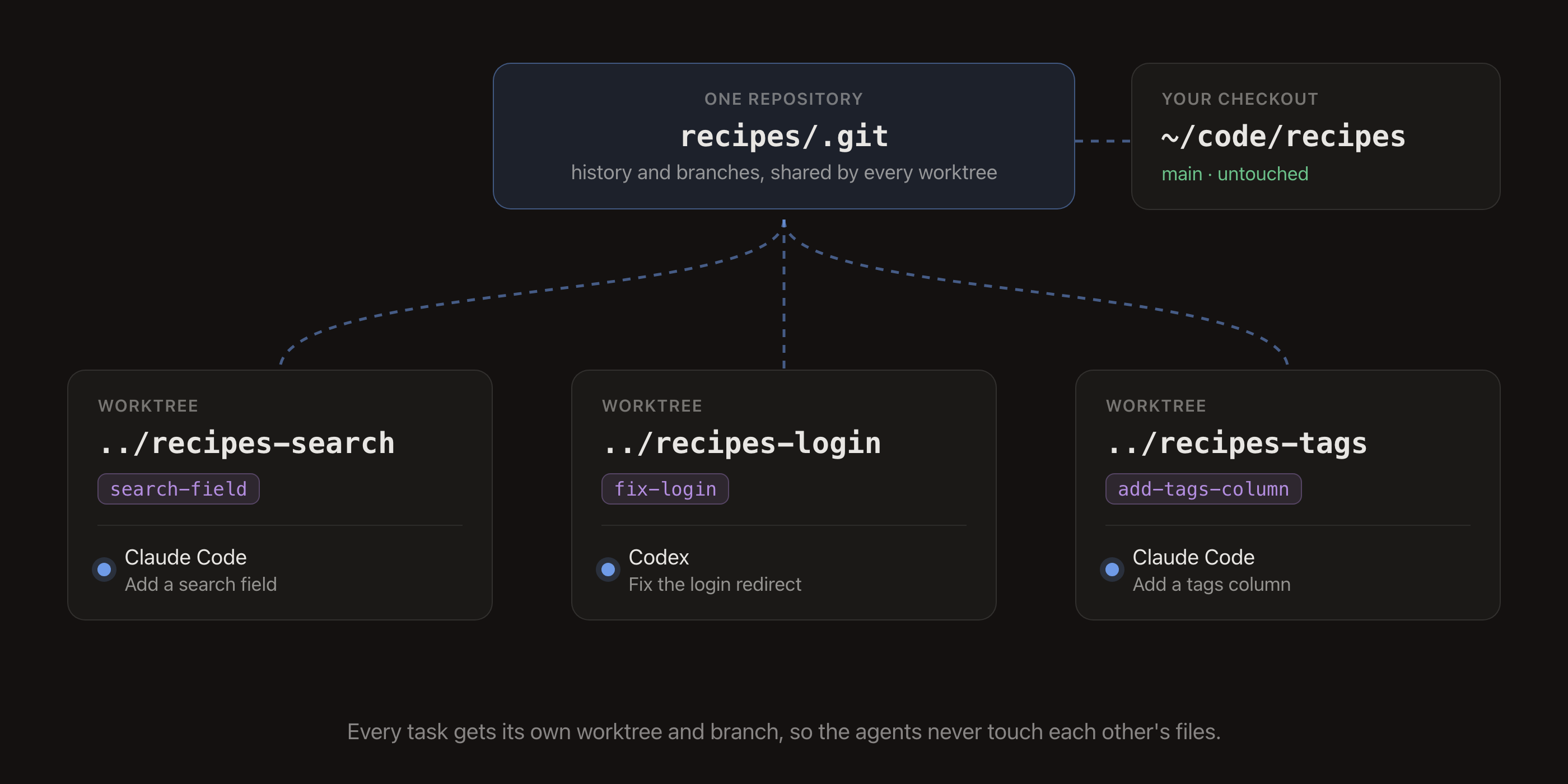
A git worktree is an additional checkout of the same repository. All worktrees share one .git folder, but each worktree has its own branch and its own files. This provides a safe way to run agents in parallel, as they never touch each other's work and your main checkout stays untouched (refer to Image 1).
How it works
Running agents in parallel with worktrees is a simple process. However, before an agent can start on a task, we need to set up three things first.
The first step is to create a worktree with its own branch for the task:
git worktree add ../recipes-search -b search-field
cd ../recipes-search
The second step is to prepare the worktree. A new worktree is a fresh checkout, so it has no node_modules, no .env and no build output. In most cases a short setup script is sufficient:
npm ci
cp ~/code/recipes/.env .env
However, there are some exceptions where more is needed. For example, if you want to run the dev server of several worktrees at the same time, you will need to read the port from an environment variable, as they can't all use port 3000.
The third step is to start the agent in the worktree and give it the task:
claudeIt is important to keep every task small enough for a single pull request. A GitHub issue is a good format for this: it tells the agent what is wanted and gives you the description for the pull request later.
When the work is merged, the worktree can be removed again:
git worktree remove ../recipes-searchCongratulations! Your agents are now running in parallel without getting in each other's way. By giving every task its own worktree, you have eliminated the conflicts between agents, and you can review and merge every task on its own.
The Compagnion way
Of course this can be automated. For this we built Compagnion, a native Mac app for Claude Code and Codex (refer to Image 2). Every workspace is a worktree with its own branch, every repository gets a setup script, a run script and custom actions like Test, and you go from a GitHub issue to a merged pull request without leaving the app.
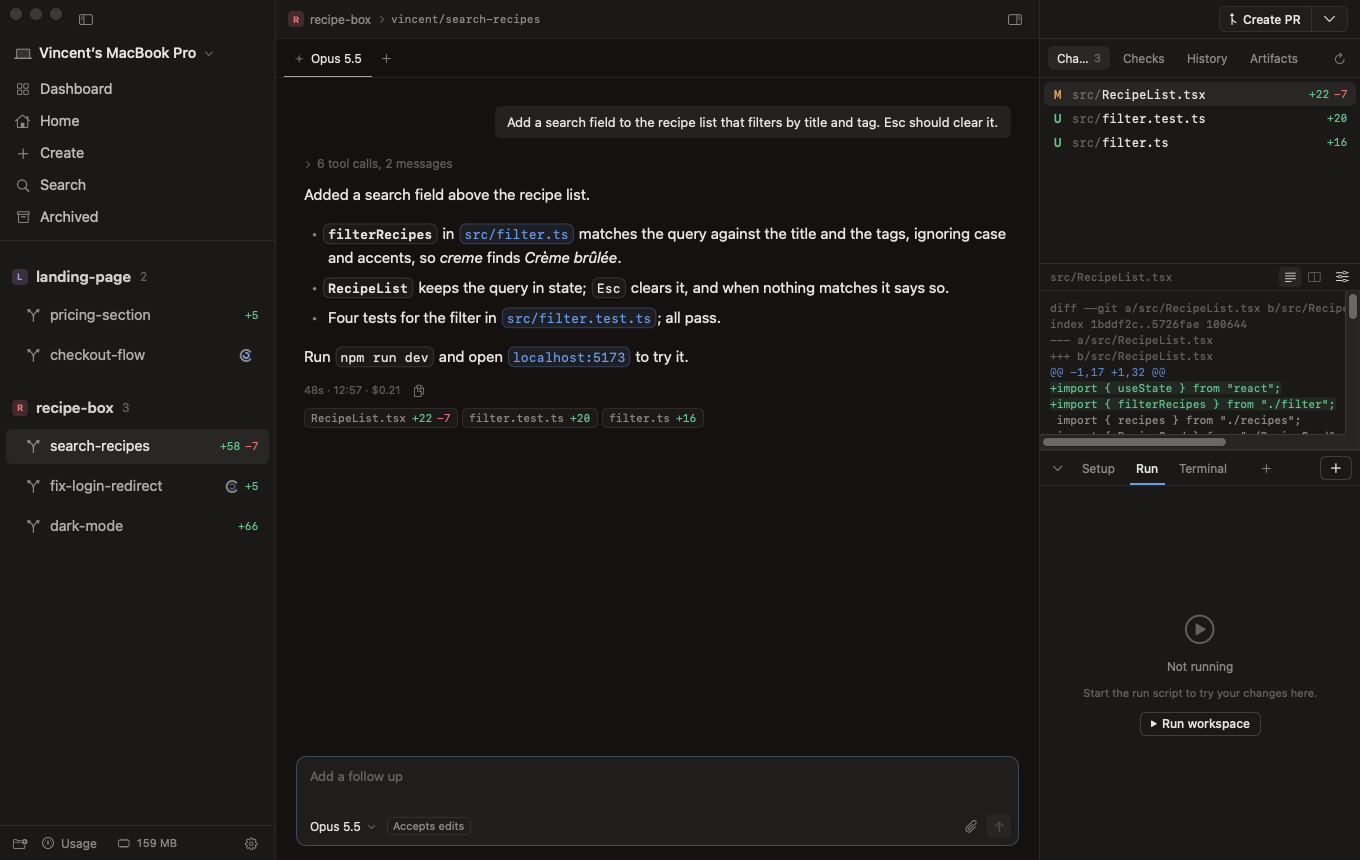
We use Compagnion every day to build Compagnion itself, with several agents working on it at the same time. That is also where most of its features come from: whatever gets in our way, we fix. A few things we do our own way:
- The agents run in a daemon. The app is a client of a small Rust daemon, just like the
compagnioncommand-line tool that comes with it. Close the window and the agents keep working; your Mac stays awake while they do. - Secrets stay out of the chat. Paste a token, a password or a private key and it becomes a lock chip, recognized on your Mac without anything going over the network. The agent receives a file it can use in a command, so the secret never ends up in the chat, the history or the prompt.
- Every turn is a snapshot. Compagnion snapshots the working tree at the start and end of every turn, for both Claude Code and Codex. You see what each turn changed and can revert a single turn with one click.
- Commands in an answer can run. When the agent suggests a shell command, it gets a Run button that runs it in the worktree. When
sudoorsshasks for a password, the input becomes a hidden password field. - You see what's left. A ring in the composer shows how full the session's context is, together with the limits of your Claude plan.
- Native, all the way. SwiftUI without a web view, and the Windows app will be just as native.
Your repositories and history stay on your own Mac, and the agents use your own Claude or ChatGPT subscription. New releases go out several times a week, and the app updates itself, so you always run the latest version.
To install it:
brew install --cask innovative365nl/tap/compagnionNote: next up are a native Windows app, Compagnion Remote, where your workspaces run on a server so the agents keep going when your laptop is closed, and Compagnion Teams. If you would like to see how it compares to Conductor and Orca, we made a comparison.
It is important to keep your agents isolated from each other, and using a worktree per task is a great way to run several agents at once without conflicts. I hope this information has been helpful for you in getting more done with your agents.