Secrets
Paste a token, password or key and it stays out of the chat. How Compagnion recognizes it, what the agent gets, and where it's kept.
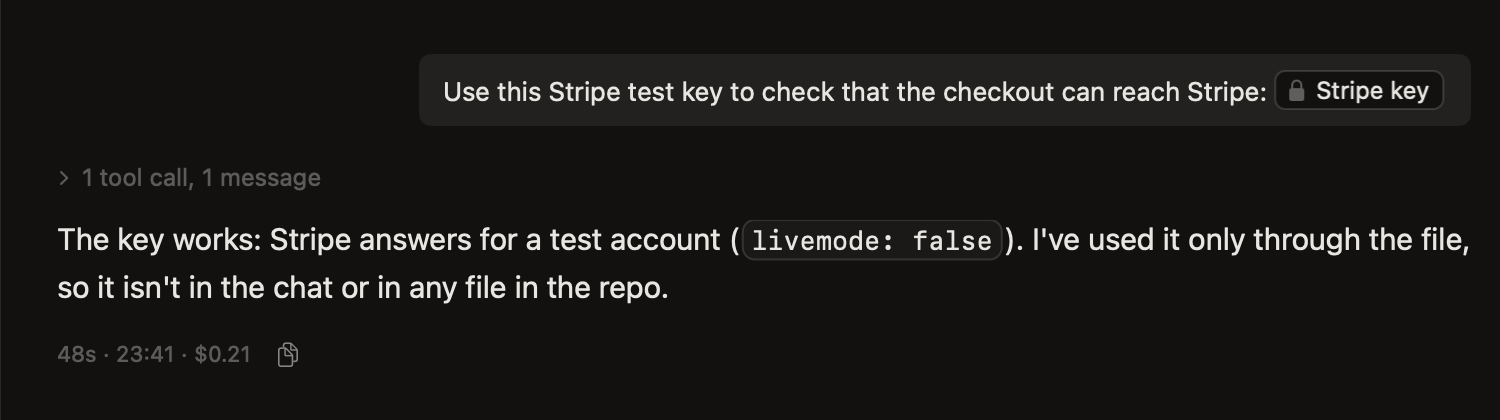
Sooner or later you give an agent a key: a test API token, a database password, a deploy key. Pasted as text, it ends up in the chat, in the session's history and at the model's provider. Compagnion keeps it out of all three.
How it works
Paste or type it. In the composer of a session, or in Create, something that looks like a secret turns into a chip with a lock, right where it was. Compagnion recognizes it on your Mac; nothing goes over the network for that.
Send. The secret goes to the workspace as a file of its own, in
.compagnion/.secrets/, readable only by you. It's left out of Artifacts and removed with the worktree.The agent gets the file, not the secret. Instead of the key, the agent gets the file's path, with the request not to read it but to use it in commands:
curl -u "$(cat '.compagnion/.secrets/f19162627dc2/Stripe key'):" https://api.stripe.com/v1/balanceThe shell fills in the key when the command runs, so the key itself doesn't appear in the chat or in what the model sees.
In the chat the message shows the lock chip. Hovering it says the secret stays hidden; it doesn't open.
What counts as a secret
- Tokens with a known prefix: GitHub, GitLab, Anthropic, OpenAI, AWS, Slack, Stripe, Google, npm, and JSON Web Tokens.
- Private keys and certificates in PEM format (
-----BEGIN … KEY-----). - The password in a URL, such as
postgres://user:password@host/db. - The value after
password=,API_KEY:,secret:and the like. - Long random-looking words.
A word you're still typing stays text until you move on: type a space, send, or leave the field.
When it isn't a secret
Before you send, click the chip in the composer: it says what Compagnion recognized, with OK. If it's a false alarm, or you do want the text in the chat, choose Show as Text; then it goes in as ordinary text. That applies to that message only: paste the same text again, or use it in a next message, and it's a lock again.
Long pasted text that contains a secret stays text, so the secret is taken out as a chip and the rest goes in as usual.
What it doesn't do
This prevents accidents; it isn't a vault. The agent can read the file if it decides to, and a command that prints the secret puts it in the output. The point is that a key you paste for a task doesn't end up, by default, in the conversation, its history or the prompt.